
AI Coding Agents Are Becoming Execution Layers
The Shift Happening Right Now
Cursor's product direction, reported growth, and internal engineering workflow all point toward the same shift: AI coding tools are becoming execution layers for software work.
For example, in March 2026, Cursor shipped Automations for Pro users. Cursor's Automations are background agents that can be assigned recurring or event-driven engineering work. Instead of waiting for a developer to open the IDE and ask for help, these agents can run on a schedule or respond autonomously when something happens in the team's workflow. Some of the triggers provided by Cursor's Automation include Slack messages, Linear issues, merged GitHub PRs, PagerDuty incidents, and custom webhooks. They run in cloud sandboxes, connect to tools through MCP, and keep changes quarantined until a human approves.
Additionally, Cursor has been open about how it refines the system around its model (the agent harness that controls context, tools, and checks). They have described testing different versions of their agent workflow and measuring whether those changes improve speed, cost, tool usage, cache behavior, and output quality. This tells us that the same model can feel more dependable inside Cursor than it does through a raw API, because the model is only one part of the workflow. The surrounding system determines how much context it gets, when tools are used, when checks run, and how the work is prepared for review.
Furthermore, Cursor's reported jump from ~$100 million ARR in early 2025 to about $2 billion annualized revenue by early 2026 raises the question: how much of their progress is due to a feedback loop of using their own product to improve it? This is partially answered by the fact that, as noted in a February 2026 forum post, over 30% of its merged pull requests were already being created autonomously by cloud-sandboxed agents. That does not mean every engineering team will see the same result, but it does show where Cursor is placing its bet.
Not to mention, Cursor has moved far beyond its original goal of selling model access inside an editor; it is actively building an environment where context, execution, and review sit close enough together for agent output to become usable, reviewable engineering work.
This matters for production teams because useful agent output is not the same thing as production-ready work. A model can generate a plausible answer, but the harness still determines whether that answer can become usable work. It is the difference between code that looks right in a chat window and code that is optimized for your codebase and infrastructure.
What Cursor's Agent Harness Actually Is
Cursor's best practices post describes a harness as three connected pieces:
- Instructions — prompts, rules, skills
- Tools — edits, search, terminal, MCP
- Model — the model you select for the task
The harness is the orchestration layer that wires them together. Different models respond differently to the same prompt, so a strong harness adapts (e.g., routing shell-heavy work one way and search-heavy work another).
Example:
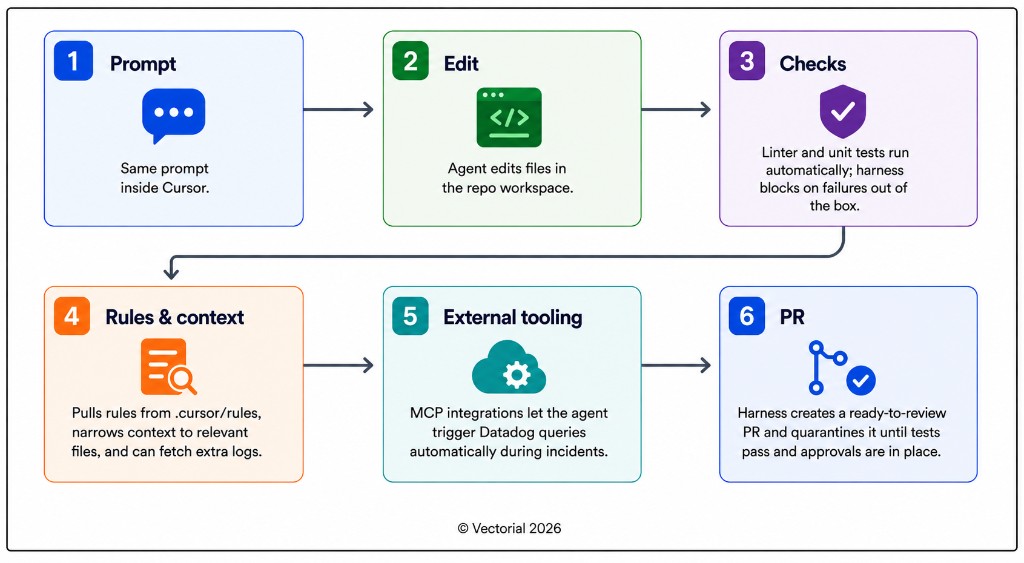
Cursor vs. Everyone Else
Four leading coding agents use similar frontier models, yet they feel wildly different in practice because of one thing—the harness, the workflow layer that controls context, tools, and guard-rails. Here’s a closer look at how Cursor’s harness stacks up against Codex, Copilot, and Claude Code.
| Dimension | Cursor | GitHub Copilot | Claude Code | OpenAI Codex |
|---|---|---|---|---|
| Primary Interface | IDE-first coding environment with cloud agents/Automations. | GitHub-first and editor-integrated. Works across GitHub.com, VS Code, JetBrains, Visual Studio, GitHub CLI, and collaboration tools. | Terminal-first, with access through terminal, third-party IDE, Slack, and web. | OpenAI coding agent available through CLI, IDE, app, and cloud/web surfaces. |
| Intelligent Code Autocomplete | Yes. Cursor Tab is a core part of the product. | Yes. Copilot autocomplete is a core part of the product. | No. Focused on agentic coding sessions rather than inline autocomplete. | No. Focused on agentic coding sessions rather than inline autocomplete. |
| Multi-model Usage | Yes. Supports switching between multiple frontier models. | Yes. Supports model selection across multiple providers/models depending on plan and surface. | Limited. Primarily optimized around Anthropic's Claude models. | Limited. Primarily optimized around OpenAI's models. |
| Source Model | Closed source. | Closed source. | Closed source. | Open source code for Codex CLI. |
| Context Selection | Uses repo-aware context, semantic search/RAG-style retrieval, project rules, and IDE state. | Same as Cursor. | Uses project context, local files, commands, and instruction files such as CLAUDE.md. | Same as Cursor. |
| Verification Loop | Deeply integrated in the IDE. The user can click through the various edits made, see the full context, and accept/reject/edit specific changes. | Same as Cursor. | PR-style review, not heavily integrated into IDEs. The user is given a diff and no further ability to edit without opening a separate IDE or continuing prompting. | Same as Claude Code. |
The comparison shows that each tool makes different harness decisions. Cursor gives teams a more structured IDE-native workflow, where context, edits, checks, and review are tightly connected inside the developer workspace. Copilot fits naturally into teams that already use GitHub heavily, especially around PRs, Actions, repository permissions, and cloud agent workflows. Claude Code and Codex give teams more flexibility because they are terminal-first. That makes them easier to plug into custom scripts, CI/CD pipelines, and internal tools, but teams usually need to define more of the surrounding workflow themselves, including test execution, tool access, review gates, logging, and how changes move into a pull request.
At Vectorial, we use Cursor heavily because it makes agent-generated code easier to audit inside the repo. Its harness is also benchmarked as stronger than the other options we compared, which makes it a strong default for day-to-day development work.
But Cursor is not the answer for every agent workflow. If the agent needs to run outside the IDE, interact with proprietary systems, follow custom approval logic, or produce audit trails for a regulated workflow, the harness decision becomes broader than developer productivity. At that point, the question is whether the vendor's workflow fits the client's environment, or whether the orchestration layer needs to be designed around the client's tools, rules, and governance.
For example, one pattern where Codex has a clear advantage is when an agent needs to be embedded directly into a product rather than housed in a separate development tool. Codex's open-source CLI surface gives teams more flexibility than a closed vendor workflow, and we have used that pattern in client work before. In those cases, the agent was not just helping engineers build the product. It was becoming part of the product itself. The open-source surface mattered because the agent experience needed to fit the product's workflow, not sit alongside it in a developer tool.
That said, the practical choice comes down to where the work happens. If the agent lives inside the IDE and the team wants stronger out-of-the-box verification, Cursor is the stronger default. If the workflow runs outside the IDE, requires model flexibility, or the agent needs to fit into a product or pipeline the team controls, Claude Code or Codex are the better starting point. Copilot sits in the middle, and is the natural fit for teams already deep in the GitHub ecosystem who want the agent close to where code is reviewed and shipped.
What to Verify Before You Standardize
Before you standardize on any vendor harness, you need to test where the platform's assumptions line up with your actual engineering process and where they start to break. Here are a few questions to help you get started on your evaluation.
Data-Residency/Deployment Options — Some platforms run only in the vendor's cloud. If you later need EU-only or on-prem, you are stuck. Ask for a region list and any self-hosted or VPC install path before you commit.
Multi-model Flexibility — Today's "best" model may change. Lock-in to one provider can block upgrades or cost moves. Can the harness swap models and/or providers per environment without vendor work?
Approval Gates — Who can merge agent output, and is risky work quarantined by default?
Exit Cost — If you leave the vendor, do you lose orchestration logic locked in their UI?
The Takeaway
Cursor makes the lesson clear. In production, the model is only as valuable as the system guiding it. AI coding tools are becoming execution layers for software work, where the harness decides how context is gathered, how checks are run, and whether generated code is ready for review.
So when you evaluate agent platforms, the question is no longer just “which model is best?” It is whether a vendor’s orchestration layer already fits your stack, or whether you need one designed around your own governance, tooling, and control requirements.